

In the previous post, we gave our designers the context they needed to create a low-fidelity wireframe.
Here’s the wireframe they built.
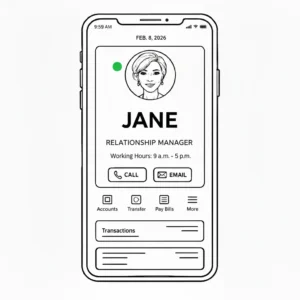
It looks simple, right?
An image of a relationship manager (RM). Their name. Their title. And options to email or call.
But it’s just one screen. And showing this screen to one million high-net-worth clients means a lot has to happen behind the scenes.
Multiple technology teams are involved in making this work.
Before we walk this wireframe with our technology stakeholders, we need to understand who those teams are and what they actually do.
Let’s start with the first team.
Mobile app developers
They are also called client-side or front-end app developers.
They turn the low-fi wireframe into a real screen inside the banking app. For this, they use programming languages such as Swift for iPhones and Kotlin for Android phones.
To build the screen, they need the RM’s image, name, and title. All of that data lives in databases.
A database is a place to store data.
Think of it like an Excel file. Each sheet is a table. Each row is a record. Each column is a field.
In our case, one table may store the relationship manager’s name, another may store their title, and another may store their image.
Database engineers ensure this data is accurate, up to date, and stored consistently.
If a relationship manager leaves and a new one joins, these engineers ensure the records are updated correctly across the databases.
But in large enterprise financial services firms, the data is spread across multiple databases. Some in the cloud and some in databases owned by the bank.
The cloud is a collection of remote servers and services owned by companies like Amazon (AWS) or Microsoft (Azure). Banks rent this computing power and storage instead of running their own servers in-house. This is mainly done to save cost and make it easier to add more storage or computing power as the bank grows.
Most modern fintechs have their entire data on the cloud, but that’s not the case for banks. Some banks are hundreds of years old, so they have their own databases that are managed entirely by the bank.
At this point, we need someone to pull all this data from different places and make it usable for the app.
That’s what data engineers do.
Their job is to combine data from multiple places, organize it in a format that the mobile app developers can use, and most importantly, they have to automate this process so it keeps running without manual work.
Let me explain what “keeps running” means.
In our case, relationship managers join, leave, change titles, or update their photos. When any of this happens, the mobile app needs to show these updates immediately. Data engineers set up automated processes that check for updates every few minutes (or even seconds) and pull the latest data from all the different databases.
This automated setup is what’s called a data pipeline.
Once the data is stitched together and organized, data engineers store it in what’s called a data warehouse or a clean database. Think of this as a well-organized filing cabinet where all the relationship manager information is kept in one place, ready to be used.
Backend engineers (who we’ll talk about next) then build the microservices and APIs that the mobile app talks to.
So what is an API?
An API is how the mobile app requests data and gets a response.
Think of an API like a waiter at a restaurant.
You (the mobile app) sit at a table and want food (data). You don’t go into the kitchen and cook it yourself. Instead, you tell the waiter what you want. The waiter goes to the kitchen (the data warehouse), gets your food, and brings it back to you in a nice, organized way.
In our feature, the mobile app asks the API, “Give me the relationship manager’s name, title, and image for this client.” The API collects that information and sends it back to the mobile app in a structured format.
These APIs are exposed by microservices.
A microservice contains the actual logic and rules. An API is simply how the mobile app talks to it.
Think of a microservice as a small, specialized department in the bank. The API is the door the app uses to ask for data.
This setup exists mainly for two reasons.
Safety and security
If the mobile app talked directly to the database, anyone who figured out how the app works could potentially access all the data in the database.
In our feature, a hacker could try to request not just their own relationship manager’s information, but information about other clients’ relationship managers, or even client account details.
Microservices act as a security checkpoint. When the mobile app asks for the RM’s information, the microservice first checks: Is this user logged in? Are they allowed to see this specific RM’s information? Only after passing these checks does the microservice retrieve the data and return it to the app.
Scalability
Scalability means handling more users without the system breaking.
Imagine 10,000 clients opening the mobile app at the same time, all requesting their relationship manager’s information.
If the mobile app talked directly to the data warehouse, too many requests would hit it at once and slow it down.
Microservices sit in between and manage this traffic. They can temporarily store frequently requested RM details so they don’t call the data warehouse every single time. This protects the data warehouse from being overloaded.
For our feature, multiple microservices might be involved:
- One microservice for identifying if the logged-in customer is a high-net-worth client
- Another for retrieving the relationship manager’s information from the data warehouse
Backend engineers (also called microservices engineers) might build new microservices or modify existing ones to fetch data from the data warehouse.
They apply checks and rules, like the traffic controls you saw above, before returning data to the mobile app.
Software architects
You might be wondering who decides which databases to use, which microservices to build, and how data flows between teams.
That’s the role of software architects.
They look at everything we’ve discussed so far and tie it together. They decide which databases are needed, which microservices to use, and what APIs the backend engineers need to build.
They also define how the mobile app will consume that data. This definition is called the API contract.
What does an API contract look like?
An API contract is written in JSON. It defines exactly what data the mobile app will receive.
Here’s an example for our feature:
{
“relationshipManager”: {
“name”: “Jane”,
“title”: “Senior Relationship Manager”,
“imageUrl”: “https://bank.com/images/rm/Jane-mitchell.jpg”,
“email”: “[email protected]”,
“phone”: “+1-555-0123”,
“availability”: “available”
}
}
This contract tells mobile app developers exactly which fields (name, title, imageUrl, etc.) they’ll receive and how that data will be structured.
The contract stays stable even when things change behind the scenes. Today, the RM’s name might come from one database. Tomorrow, it might come from three different systems stitched together. As long as the API returns the same fields, the mobile app doesn’t break.
Database engineers, data engineers, backend engineers, and mobile app developers all rely on the architecture diagram built by software architects to understand what they need to build and how their work fits together.
Without this diagram, teams can’t confidently start their work because dependencies and responsibilities are unclear.
How it all comes together
What started as a simple low-fi wireframe turns out to be anything but simple.
An image. A name. A title. An email and call option.
Behind that one screen sits a chain of decisions, systems, and teams working together.
Database engineers keep the underlying data accurate. Data engineers pull that data together and keep it fresh. Backend engineers build microservices and APIs to control how that data flows. Software architects define the blueprint that holds everything together. Mobile app developers turn all of that into a screen the client can tap.
When you understand this flow, walking a wireframe with technology stakeholders becomes very different. You’re no longer just talking about screens. You’re talking about data sources, contracts, dependencies, and sequencing.
And that’s exactly where the next step begins.
In the next post, we’ll walk through how to run a technical feasibility review using this wireframe and this understanding to turn design intent into something that can actually be built.