
I also built a working prototype in Python to demonstrate this architecture. You can find the link to the prototype here.
In the first post, we looked at the full agentic KYC workflow for high-net-worth onboarding.
In the second post, we zoomed into the CRM and Case Package piece. That is where the relationship manager captures the client information, uploads the documents, and creates the structured case package that starts the workflow.
Now we are looking at the next piece: the Workflow Controller.
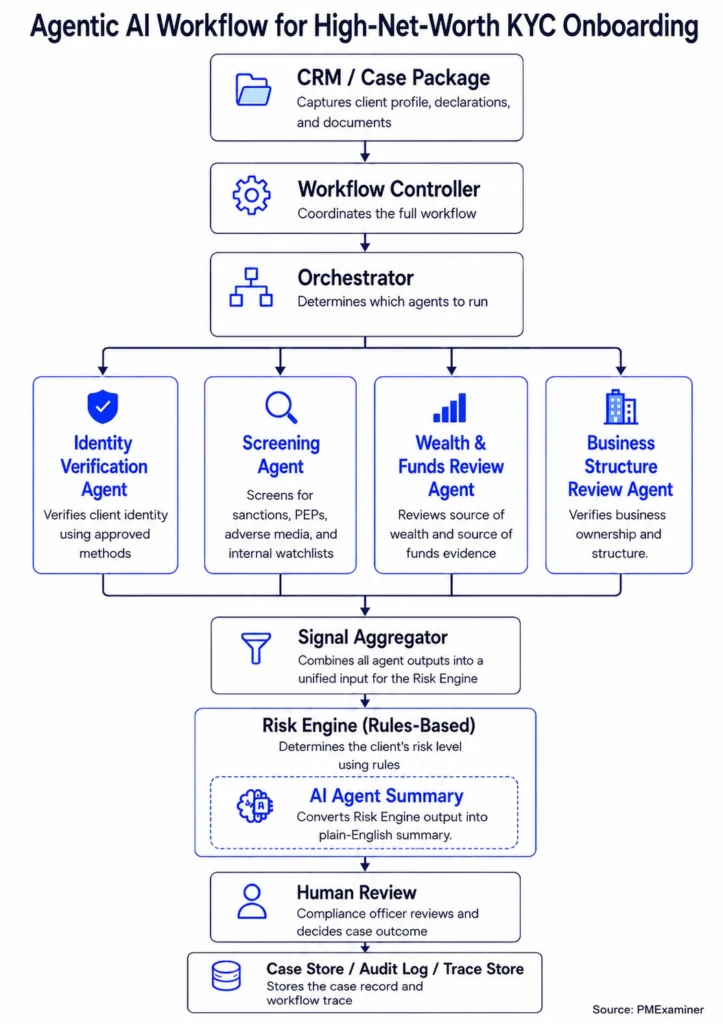
The Workflow Controller is the engine that drives the entire workflow. It starts with the case package and coordinates everything that follows. The Orchestrator, the specialist agents, the Signal Aggregator, and the Risk Engine all run under its watch until the final output reaches the compliance officer.
But coordinating the agents is only part of what it does.
The Workflow Controller also decides whether the case should continue, pause, request more information, or go to a compliance officer for review.
Let’s see how it does that.
It works with the Orchestrator to decide which agents to run.
The first thing the Workflow Controller does is send the case package to the Orchestrator.
The Orchestrator looks at the case and creates a plan. In James’s case, the plan calls for running four specialist agents: the Identity Verification Agent, the Screening Agent, the Wealth and Funds Review Agent, and the Business Structure Review Agent.
The plan also specifies which information each agent should use. For example, the Identity Verification Agent receives James’s identity details, government ID, and proof of address. The Wealth and Funds Review Agent receives his wealth profile, source of funds, bank statement, and business sale agreement.
The Workflow Controller then takes that plan and runs each agent with the right inputs.
├── Identity Verification Agent
├── Screening Agent
├── Wealth & Funds Review Agent
└── Business Structure Review Agent
But the Orchestrator does not always run just once
Sometimes new details appear after the workflow has already started.
For example, James may first declare that his source of funds came from a business sale. But later, the bank statement may show that the incoming funds came from a crypto exchange.
Or the relationship manager may first onboard James as an individual. But later, a document may show that the funds are connected to a trust or holding company.
In situations like this, the Workflow Controller sends the updated case back to the Orchestrator. The Orchestrator looks at the new details, updates the plan, and runs the right agents again.
From separate agent findings to one case view
Each agent completes its review and returns a finding like this:
├── Screening Agent: PEP match flagged
├── Wealth And Funds Review Agent: source of funds issue highlighted
└── Business Structure Review Agent: business sale context confirmed
The Workflow Controller collects these findings and sends them to the Signal Aggregator. The Signal Aggregator combines the separate findings into one unified case view.
The Workflow Controller then sends that unified view to the Risk Engine.
The Risk Engine applies rules to decide how the case should be handled.
For James, it classifies the case as high risk because of his PEP exposure, business sale wealth context, crypto-related source of funds, and cross-border activity. It also identifies what the compliance officer should focus on during review.
The Workflow Controller collects the Risk Engine output and prepares the final workflow result.
That result tells the compliance officer the risk tier, the review route, the recommended action, and a summary of what the agents reviewed.
What happens when an agent needs more information?
So far, we have looked at the path where everything moves smoothly.
But real KYC workflows do not always move in a straight line.
Sometimes an agent cannot complete its review because it needs more information or human input.
Let’s go back to James. He declares that his source of funds came from a business sale. But his bank statement shows that the incoming funds came from a crypto exchange. That is an evidence mismatch.
In that situation, the Wealth and Funds Review Agent cannot complete its review. It returns a finding that says the source of funds evidence is incomplete. The declared source is a business sale, but the bank statement shows money coming from a crypto exchange. The agent requests additional evidence: a crypto exchange statement, proof of exchange account ownership, and an explanation of the original source of the crypto funds.
The Workflow Controller reads that output and decides what should happen next. It may pause the workflow, request more information from the relationship manager, route the issue to a compliance officer, and wait for the new information before resuming the case.
↓
Is the evidence complete?
├── Yes → Continue Workflow
├── Needs More Info → Pause + Request Documents
└── Human Review Required → Compliance Officer
How does the Workflow Controller know when to pause?
The pause conditions have to be designed into the workflow from the start.
These conditions live in two places.
The first is inside the specialist agents. Each agent is designed to return a specific status when it cannot complete its review.
For example, the Wealth and Funds Review Agent returns a needs more information status when the source of funds evidence does not support the client’s declaration.
The Screening Agent returns a human review required status when there is a possible PEP match that a compliance officer needs to verify.
The second is inside the Workflow Controller.
It is coded to decide what to do when an agent returns a specific status, something like this:
If the agent says it is complete → the case moves forward
If the agent says it needs more information → the controller pauses and requests the missing information
If the agent says human review is required → the controller routes the issue to a compliance officer
What the Workflow Controller records?
The Workflow Controller also records what happened. And there are two kinds of records.
The first is the case record. This is what the bank may need to explain the case to a regulator later.
It captures which agents ran, which inputs were reviewed, what the risk tier was, what review route was selected, and what action was recommended. It also records whether human review was required, who reviewed the case, and when key steps happened.
This matters because the bank needs to be able to explain what was reviewed and why the case moved in a certain direction.
The second is the workflow execution trace. This is the technical record of how the workflow ran.
It captures which steps started and completed, where the workflow paused, and which agent returned an issue. It also records where the workflow resumed and where an error happened.
This helps engineering teams debug the workflow. If something goes wrong, they can see exactly where the issue happened and why.
That covers everything the Workflow Controller does.
The Workflow Controller is the engine that drives the entire workflow
It coordinates the agents, handles the pauses, and manages the human review touchpoints. And it makes sure the compliance officer receives everything they need to make a decision.
It also records what each agent did, what inputs were reviewed, and what decisions were made. So the bank can explain the case later to a regulator.
In the next post, we will zoom into the Orchestrator and look at how it reads the case package and decides which specialist agents should run.