

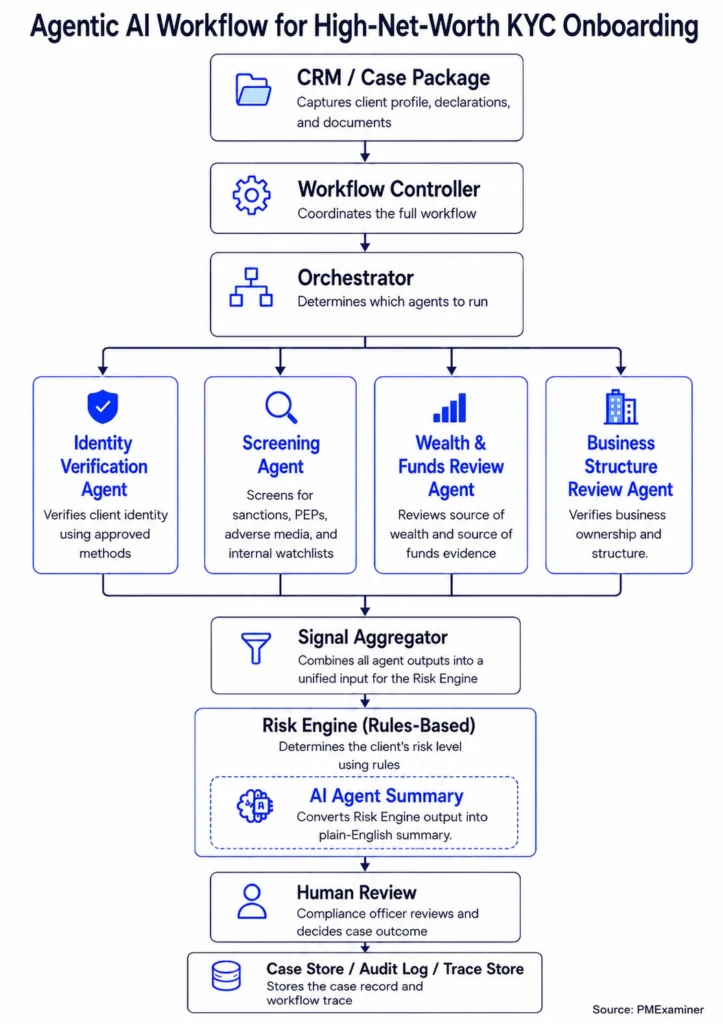
In this series, we are building an agentic KYC workflow for high-net-worth onboarding piece by piece.
- The full agentic KYC workflow and architecture
- The CRM and Case Package layer
- The Workflow Controller
- The KYC Orchestrator
- The Identity Verification Agent
- The Screening Agent (this post)
I also built a working prototype in Python to demonstrate this architecture. You can find the link to the prototype here.
The word “screening” instantly takes you to an airport.
You place your bag on the belt and walk through the scanner. The security team checks for things you should not carry on the flight.
Screening a banking client works in a similar way.
The bank is not checking the client physically. It is checking whether the client appears in sanctions lists, possible PEP records, adverse media sources, or internal watchlists.
To understand how this works, let’s see how the Screening Agent helps the bank screen a client like James.
After the Orchestrator decides that the Screening Agent should run, the Workflow Controller sends the agent the details it needs.
{
  "agent_name": "screening_agent",

  "inputs": {
    "client_identity": {
      "full_name": "James Whitmore",
      "date_of_birth": "1964-04-12",
      "nationality": "Canadian",
      "country_of_residence": "Canada"
    },

    "client_profile": {
      "pep_declared": true,
      "expected_cross_border_transactions": true
    },

    "tax_profile": {
      "tax_residency": "Canada"
    }
  }
}
The Screening Agent uses these details to check multiple screening sources. For example, it may check sanctions lists, possible PEP status, adverse media, and the bank’s internal watchlist.
Adverse media means negative news or public information that may raise a concern about the client.
Banks may use screening providers such as World-Check, Dow Jones Risk & Compliance, or ComplyAdvantage. These providers help banks check many screening sources in one place, including sanctions records, possible PEP status, adverse media, and other watchlists.
Some banks may also use their own internal watchlist database.
Here is how that works for James.
The Screening Agent sends James’s details to a screening provider:
{
  "full_name": "James Whitmore",
  "date_of_birth": "1964-04-12",
  "nationality": "Canadian",
  "country_of_residence": "Canada"
}
The screening provider checks this information against its database.
That database may include PEP records, sanctions lists, adverse media sources, and internal watchlists.
The provider may return a result like this:
Possible PEP match found

Matched fields:
- name
- date of birth
- nationality

No sanctions match
No adverse media match
No internal watchlist match
This is only one provider’s result.
In a real bank, the Screening Agent may receive results from more than one screening provider or internal database.
For example:
Screening provider A:
- Possible PEP match
- Name, date of birth, and nationality matched
- Vendor score: 0.94
- No sanctions match
- No adverse media match

Screening provider B:
- Possible PEP match
- Name and date of birth matched
- Vendor score: 0.87
- No sanctions match
- No adverse media match

Internal bank watchlist:
- No match
The Screening Agent then consolidates the providers’ results. It compares the matched fields, checks whether the providers agree, and applies the bank’s screening rules.
Those rules tell the agent how to treat each result.
For example:
If two providers return a possible PEP match, the agent treats it as a stronger signal.
If the name, date of birth, and nationality match, the agent marks the match strength as STRONG.
If only the name matches, the agent marks the match strength as WEAK.
If one provider shows a possible match and another shows no match, the agent returns HUMAN_REVIEW_REQUIRED.
These conditions should be built into the Screening Agent so it does not guess. It should know when to mark a match as strong, when to mark it as weak, and when to send the issue for human review.
The final output from the Screening Agent may look like this:
{
  "screening_status": "POTENTIAL_MATCH",
  "hit_type": "POSSIBLE_PEP_STATUS",
  "match_strength": "STRONG",

  "providers_checked": [
    "screening_provider_a",
    "screening_provider_b",
    "internal_bank_watchlist"
  ],

  "sanctions_match": false,
  "adverse_media_match": false,
  "internal_watchlist_match": false,

  "requires_human_review": true,

  "summary": "Two screening providers returned a possible PEP match for James. No sanctions, adverse media, or internal watchlist match was found."
}
As you can see, the output clearly explains the issue. Two providers returned a possible PEP match for James, but there was no sanctions match, no adverse media match, and no internal watchlist match.
The Workflow Controller then takes this output and sends it to the Signal Aggregator.
Screening does not always return a clear result.
When that happens, the agent should return the issue for human review instead of deciding on its own.
Here are three common scenarios.
The first scenario is a partial match. James’s name may match a possible PEP record, but the date of birth may not match. In that case, the Screening Agent should not treat it as a confirmed match. It should return the issue to the Workflow Controller so a compliance officer can decide whether it is the same person or a false positive.
The second scenario is disagreement between providers. One screening provider may return a possible PEP match, while another provider may return no match. The Screening Agent should not blindly choose one provider over the other. It should flag the disagreement and ask for human review.
The third scenario is adverse media that needs interpretation. A screening provider may return a possible adverse media hit, but the article may be old, unclear, or about a different person with a similar name. The Screening Agent can flag the result, but a human reviewer may need to decide whether the article is relevant to James’s case.
These conditions must be built into the Screening Agent. The agent should know when the result is clear enough to send back to the Workflow Controller and when it needs human review.
In these situations, the Screening Agent returns a status such as:
HUMAN_REVIEW_REQUIRED
Or
NEEDS_MORE_INFORMATION
For example:
{
  "screening_status": "HUMAN_REVIEW_REQUIRED",

  "reason": "One provider returned a possible PEP match, but another provider returned no match.",

  "review_focus": [
    "Compare provider results",
    "Review matched fields",
    "Determine whether the hit is a true match or false positive"
  ]
}
The Workflow Controller then pauses the screening step and decides what should happen next. It may route the issue to a compliance officer, send it to a screening operations team, or request more information from the relationship manager.
Once the human reviewer resolves the issue, the workflow can continue working on the case.
That is how the Screening Agent handles unclear screening results.
Let’s quickly recap what we saw.
The Screening Agent checks James’s profile against relevant screening sources by sending his details to screening providers and internal systems. It consolidates the results, applies the bank’s screening rules, and returns a clear screening result to the Workflow Controller.
Sometimes that result is clear enough for the workflow to continue. But when the result is unclear, the agent does not guess and returns the issue for human review. That includes a partial match, disagreement between providers, or adverse media that needs interpretation.
That is how the Screening Agent screens James’s profile inside the agentic KYC workflow.
Just like airport screening, the goal is not to stop every person from moving forward. The goal is to find the cases that need closer attention before they pass through.
In the next post, we will look at the Wealth and Funds Review Agent and how it reviews James’s source of wealth, source of funds, and crypto funds.